Guides · Building
Best TV bracket for a media wall (UK): fixed, tilt or full motion
How to choose a TV wall bracket for a timber-framed media wall, covering VESA patterns, weight, depth, tilt and fixing into studs and noggins, with brackets compared from their published specs.
We haven't tested these products. This comparison is based on makers' published specifications and manuals, retailer listings and owner reviews (checked 15 November 2026).
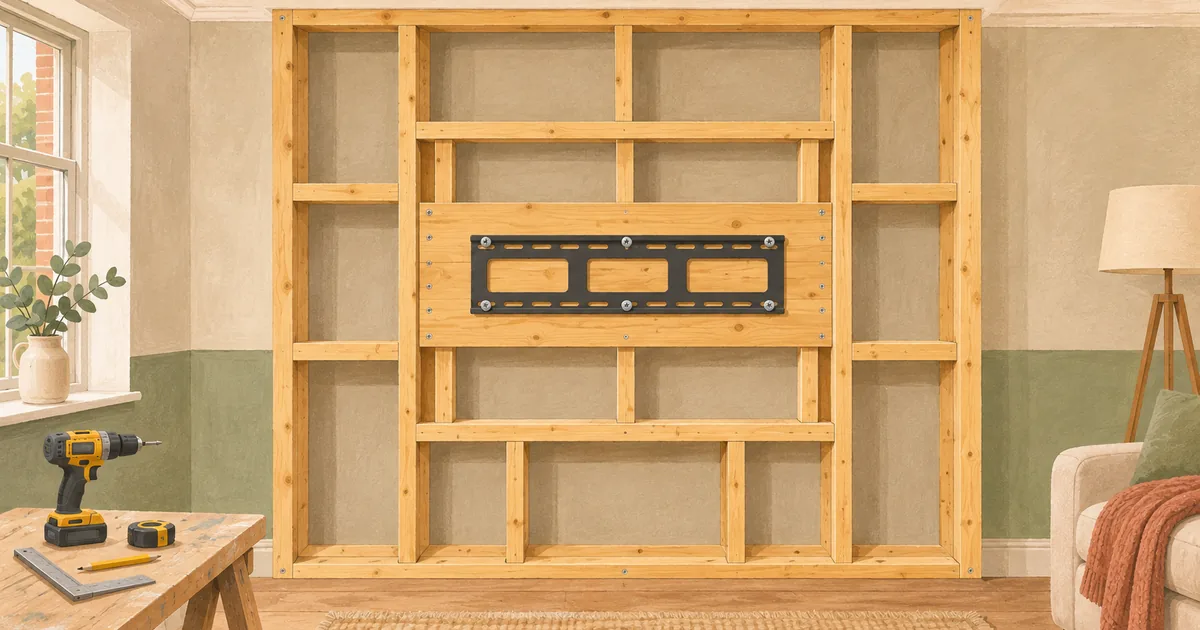
On a media wall the bracket is the easy part. The hard part is giving it something solid to fix into. Plan a timber pad or noggins behind the TV position before you board, then choose a bracket that matches your TV's VESA pattern and weight and the look you want: flush and fixed, tilting to angle the screen down above a fire, or full motion.
Step 1: read your TV's VESA pattern and weight
VESA's flat display mounting interface standard defines the hole patterns on the back of flat TVs, and it covers screens up to 90 inches. The pattern is written as horizontal × vertical spacing in millimetres. Your TV's spec sheet gives it. For example, Samsung UK lists the 2026 U8000H 65 inch with a 200 × 200 VESA pattern at 14.1 kg, and the 75 inch with 400 × 300 at 21.6 kg (both without stand).
The bracket's listed VESA range must include your pattern, and its weight rating must comfortably exceed your TV's weight. Samsung UK's product guide says it is not liable for problems when a non-VESA or non-specified mount is used.
Step 2: pick the type
| Type | Good for | Watch out for |
|---|---|---|
| Fixed / low profile | The neatest, flattest look, and recessed TV pockets | No adjustment, so cable access is fiddly |
| Tilt | A TV above a fire, angled down towards the sofa | Adds a little depth |
| Full motion (swing arm) | Corner seating, or pulling the TV out to reach ports | Deepest when folded; heavier load on the fixings |
Samsung's wall-mounting advice mentions a maximum tilt of 15 degrees. Tilt helps when a fire under the TV pushes the screen above eye level: see TV above an electric fire.
Brackets compared from their listings
The figures below are from each product's Amazon UK listing, opened on 15 November 2026. We haven't fitted them. Check the current listing and the instructions before buying.
Low-profile tilt: XINLEI Universal Tilt TV Wall Bracket, 37–85 inch (MT5083)
Listed for 37–85 inch TVs up to 60 kg, VESA 200 × 100 to 600 × 400, 0–8° tilt and about 3.8 cm from the wall. The listing says it fits 16-, 18- and 24-inch stud spacing and isn't for plasterboard alone, so it needs timber behind.
Heavier-duty tilt: BONTEC Tilt TV Wall Bracket, 17–86 inch, up to 75 kg
Listed for 17–86 inch TVs up to 75 kg, VESA 75 × 75 to 600 × 400, 10° tilt and about 3 cm from the wall (model 119SB). The higher weight rating suits larger, heavier sets.
Full motion: PERLESMITH Full Motion TV Wall Bracket, 37–85 inch, 60 kg
Listed for 37–85 inch TVs up to 60 kg, VESA 200 × 100 to 600 × 400, −15° to +5° tilt, ±60° swivel, and 76–376 mm from the wall (model PSPILFK1-E).
Full motion: BONTEC Full Motion TV Wall Bracket, 32–85 inch, 60 kg
Listed for 32–85 inch TVs up to 60 kg, VESA 200 × 100 to 600 × 400, ±10° tilt, ±45° swivel, and 65–390 mm from the wall (model CT-135B).
Step 3: plan the fixing in the frame
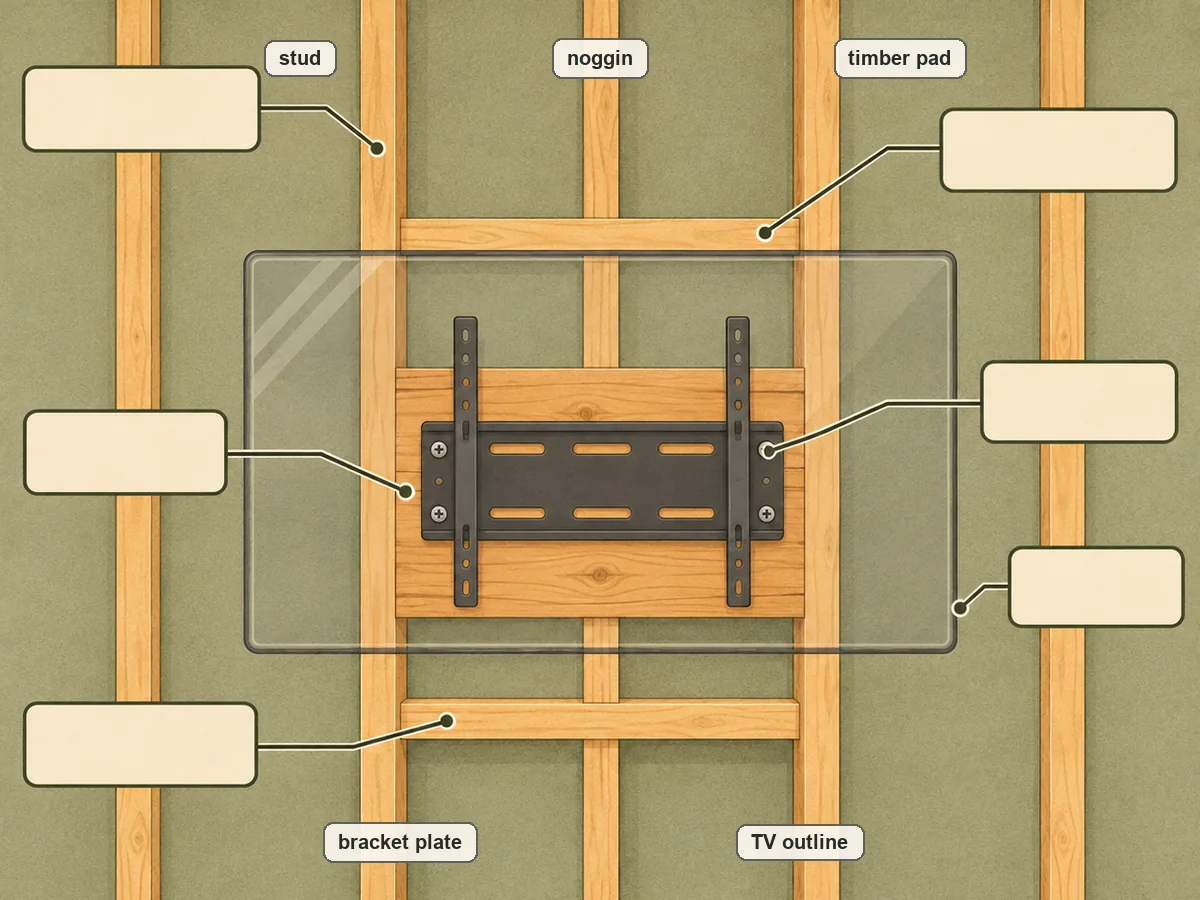
Plasterboard alone is not a fixing for a TV. In a media wall you control what's behind the board, so:
- Add noggins or a solid pad across the studs where the bracket plate will sit. Size it to cover the bracket's full fixing pattern, plus room to move the TV up or down a little.
- Photograph and measure the pad position before boarding, and mark it on the board.
- Use the screws in the bracket's instructions, sized for timber, and make sure they reach well into the pad.
- Full-motion arms lever on the fixings. Give them a stronger pad and keep the TV's weight well inside the rating.
- Check for cables and pipes in the original wall before fixing anything into it. Electrical Safety First warns against drilling or screwing near hidden cables.
Step 4: depth and cables
A fixed bracket keeps the TV about 3 cm off the wall, so plan a cable route through the wall rather than behind it. A brush plate or recessed box behind the screen keeps the plugs flush. Our electrics and cables guide covers conduit and draw cords. For a TV set into a recess, leave ventilation space: Samsung suggests about 10 cm around its sets.
Plan it with numbers: the free media wall planner works out the TV height, recess, frame size, depth and a materials list from your room and your fire's published sizes.
Common questions
Fixed or tilt above an electric fire?
If the screen ends up above seated eye level, which is common with a fire underneath, a tilt bracket lets you angle it down towards the sofa. LG UK suggests the middle of the screen at eye level or slightly below, so the higher the screen, the more tilt helps. A fixed bracket is the neatest choice when the TV sits at a comfortable height, for example on a TV-only wall or with the fire beside it.
Does the bracket change the fire clearance?
No. The fire's manual sets the gap from the top of the fire to the TV, and that gap is measured to the TV itself, wherever the bracket puts it. A full-motion arm that lets the TV swing lower must not bring it inside that gap. Set the TV's lowest position so it still clears the fire's stated minimum.
Should the TV be recessed into the wall?
A recessed pocket looks sleek, but the TV still needs air around it. Samsung UK's product guide asks for about 10 cm of space around its sets for ventilation. Make the pocket big enough for the TV, the bracket and that gap, and leave room to reach the ports.
What if I change the TV later?
Make the timber pad bigger than you need. A bigger TV may have a wider VESA pattern (Samsung's 75-inch U8000H uses 400 × 300, while the 65-inch uses 200 × 200), and you may want it slightly higher or lower. Brackets with a wide VESA range, like those above, cover most sizes. Also note where the pad is, so you can find it again under the paint.
Sources
Opened and checked on 15 November 2026.
- vesa.org/wp-content/uploads/2010/12/FDMI-Overview.pdf
- samsung.com/au/support/tv-audio-video/things-to-consider-before-mounting-the-tv-on-a-wall/
- samsung.com/uk/support/basic-product-guide-tv/
- samsung.com/uk/tvs/uhd-4k-tv/u8000h-65-inch-crystal-uhd-4k-smart-tv-ue65u8000hkxxu/
- samsung.com/uk/tvs/uhd-4k-tv/u8000h-75-inch-crystal-uhd-4k-smart-tv-ue75u8000hkxxu/
- electricalsafetyfirst.org.uk/safety-advice/home-and-people/diy-ers/
- lg.com/uk/lg-experience/helpful-hints/how-to-measure-and-read-tv-sizes/